If you’re not looking for an in-depth course but would prefer a quick introduction, we recommend the ArcGIS Intro course. If you’re already familiar with ArcGIS, the ArcGIS Advanced Course might be right for you!
Why GIS Is Important
GIS plays an indispensable role in today’s society. This powerful tool helps us understand and analyze the world and make better decisions based on location data. The importance of GIS cannot be overstated, and here are a few reasons why:
- Better decision-making: Whether it’s government planning, business location analysis, or emergency response, GIS provides the tools to make informed decisions.
- Improved efficiency: From route planning to optimizing service calls, GIS improves operational efficiency across various industries.
- Cost savings: Through more precise planning and management, GIS helps reduce costs—for example, in construction and infrastructure management.
- Improved communication: Maps and visualizations created with GIS are powerful communication tools that can convey complex situations simply.
By taking the ArcGIS Fundamentals Course, you’ll not only learn how to use GIS for these purposes, but you’ll also have the opportunity to create your own maps and analyses that can make an impact in your field. Mastering ArcGIS Pro enables you to visualize data in new and innovative ways. This gives you a competitive edge in many sectors that rely on geographic data.
In the following sections, we’ll delve deeper into the specific skills and techniques you’ll learn in the course, and how they’ll enrich your understanding of and ability to work with GIS. Are you ready to discover how you can explore the world of geographic data with Geo-ICT and ArcGIS Pro?
The Benefits of ArcGIS
ArcGIS Pro is an advanced platform specifically designed for professionals involved in geographic data analysis and map creation. Some of the benefits of this program include:
- Improved performance; ArcGIS makes optimal use of modern hardware. This results in faster data processing and visualization.
- Comprehensive analytical tools that enable users to perform complex data analyses and gain in-depth insights from their geographic data.
- Flexible data management, allowing users to easily organize, edit, and share datasets, both locally and in the cloud.
- Advanced cartographic capabilities, allowing users to create professional maps that are rich in detail and visually appealing.
The focus on 2D functionalities in this course enables participants to thoroughly understand and apply the core aspects of GIS work, from generating maps to analyzing geographic data. This makes ArcGIS an essential tool for anyone involved in spatial planning, environmental management, and many other applications where geographic information plays a central role.
By taking this course, you’ll not only gain practical experience with these benefits but also learn how to harness the power of ArcGIS Pro to perform effective and informative geographic analyses. Discover how ArcGIS Pro can transform the way you work with geographic data.
What You’ll Learn in the ArcGIS Fundamentals Course
Introduction to the Interface and Features
ArcGIS Pro stands out for its user-friendly interface and extensive features. As you get started with this software, you’ll find that navigation is intuitive, with accessible menus and tools that significantly simplify your workflow. The interface is designed to support both beginners and advanced users in GIS, with customizable layouts that you can tailor to your specific project needs.
A thorough introduction to the interface in our course will enable you to quickly create maps, analyze data, and share results with colleagues or the public. This introduction also includes an overview of essential features such as managing geographic data, performing spatial analyses, and using ModelBuilder for automated processes.
This section of the course will equip you with the skills you need to harness the full potential of ArcGIS Pro for your projects and research.
Creating Maps and Analyzing Data
When working with ArcGIS Pro, one of your most important skills will be generating maps and analyzing data. This software is a powerful tool that enables you to perform comprehensive geographic analyses and visualize complex datasets. You’ll learn how to combine data from various sources to gain in-depth insights and how to transform these insights into visually appealing and informative maps. This process is crucial in many sectors, such as urban planning, environmental sciences, and public safety, where the ability to correctly interpret and present data directly influences decision-making and policy development.
ArcGIS Pro stands out for its advanced analytical capabilities. You’ll work with tools for spatial analysis, statistical analysis, and more. This allows you to identify patterns and relationships in your data that aren’t immediately apparent. These analyses can help predict trends, evaluate scenarios, and make data-driven decisions. You’ll also learn how to use ModelBuilder, a tool that automates analytical processes, allowing you to work more efficiently and making complex analyses more accessible.
Through this section of the course, you’ll not only learn how to perform powerful geographic analyses but also how to communicate your findings in a clear and understandable way. This is an essential skill for professionals who work with geographic information, as it enables them to share their work with colleagues, policymakers, and the public. With the skills you’ll gain in this course, you’ll be well-equipped to tackle the challenges of modern geographic information science and make an impact with your work.
Practical Applications of ModelBuilder and Raster Layers
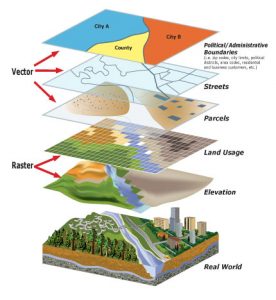
ArcGIS’ ModelBuilder and working with raster layers are essential skills for advanced GIS analysis. ModelBuilder enables you to create automated workflows, which make repetitive tasks more efficient. This is especially useful for:
- Performing sequential data processing
- Integrating various analytical steps into a single process
Raster layers are crucial for working with satellite imagery, aerial photos, and other pixel-based data. They are particularly useful for:
- Environmental monitoring and analysis
- Urban planning and land-use management
- Natural disaster assessments and response planning
By completing this section of the course, you’ll learn how to use these tools to solve complex geographic problems. This will take your GIS projects to the next level.
Why Choose Our ArcGIS Fundamentals Course?
Our ArcGIS Fundamentals Course offers a unique learning experience you won’t find anywhere else. Why choose us?
- Expert Instructors: Our instructors are experienced professionals with in-depth knowledge of GIS.
- Practical approach: We emphasize hands-on learning so you can truly master the software.
- Flexible learning options: We offer both online and in-person classes to meet your needs.
By choosing our course, you’re ensuring a learning journey that’s not only informative but also practically prepares you to work with ArcGIS Pro.